
Orca Slicer Filament Profiles: How-to Collection — Complete Guide
Why Filament Profiles Matter
Filament profiles are the most powerful lever for consistent 3D print quality. Instead of tweaking a bunch of dials each time you mount a new spool, Orca Slicer filament profiles let you store a dialed-in recipe — temperature, flow ratio, max volumetric speed (MVS), retraction setting and fan profile — that’s tagged with your supplier, then material, then color, then maybe lot number. Calibrate once, save the preset, and reuse it accurately in other projects.
What Even Is an Orca Slicer Filament Profile?
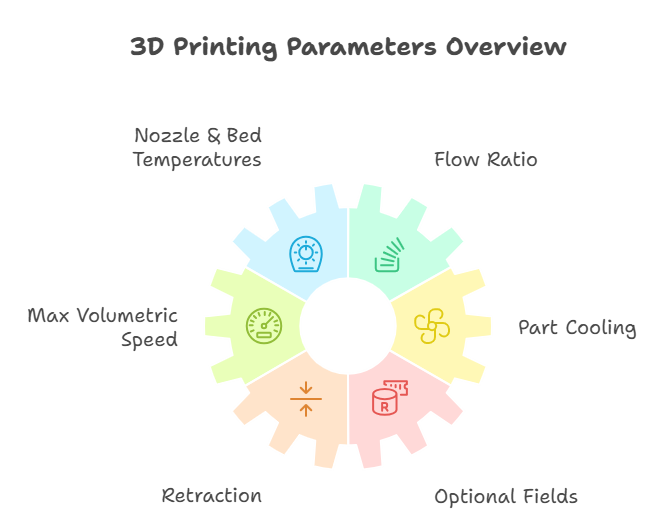
A filament profile typically covers:
- Nozzle & Bed Temperatures: base, first layer, and range limits.
- Flow Ratio (Extrusion Multiplier): changes the amount of plastic that is being pushed out versus what you want.
- Max Volumetric Speed (MVS): maximum speed of extrusion (mm³/s) your hotend/filament is capable of.
- Part Cooling: how the main and any optional additional fan actuates.
- Retraction: distance & speed adjusted for direct vs Bowden configurations.
- Optional fields: filament density and value to calculate an accurate cost of print.
Quick win: keep print/process parameters (layer height, infill, supports) in a print profile and material behavior in a filament profile. That separation protects against incidental breakage as you exchange materials.
Where the Filament Profiles Are Stored and Edited
- Launch Orca Slicer → navigate to the Prepare workspace.
- Click the gear icon in the Filament panel to open the Filament Preset Editor.
- Clone an existing preset or make your own with options for temperatures, flow ratio, MVS, cooling, and retraction.
- Save it under a distinctive name (naming strategy below).
A 10-Minute Calibration Routine (That You Will Be Able to Stick With)
Use this when you open a new spool or change your nozzle.
Bracket Temperatures
Start with the manufacturer’s range. Test in a window of −10 °C to +10 °C around the midpoint for your machine and nozzle size.
Print a Temperature Tower
Look closely at each band for stringing, layer bond, bridging, surface luster. Identify the ideal zone (not necessarily just pretty — pragmatism is key here).
Flow Ratio (Single-Wall Method)
- Slice a single-wall cube with a known line width.
- Measure the wall thickness with a micrometer/calipers.
- Tune flow ratio so measured ≈ predicted. Re-print quickly to confirm.
Tune Retraction
Run a retraction test. Step up distance/speed until stringing drops without causing heat-creep or near jams.
- Direct-drive: shorter distance, moderate speed.
- Bowden: longer distance, careful speed.
Set a Safe MVS Cap
Run a small speed/flow probe. Stop if the infill or walls start under-extruding or the surfaces become matte/rough.
Set MVS a fraction below that point when aiming for reliability over long prints.
Save as a Custom Profile
Example naming: Vendor_Material_Color_Lot_N0.4_2026-01.
Add notes: optimum temp band, final flow ratio, retraction pair, MVS cap.
Also Read: Orca Slicer Keyboard Shortcuts
What to Name It and How to Version It (So You Don’t Go Crazy)
Use consistent, search-friendly names:
Format: Vendor_Material_Color_Lot_N{Nozzle}_YYYY-MM
Examples:
eSun_PLA+_MatteBlack_L2309_N0.4_2026-09Prusament_PETG_SignalWhite_L2402_N0.6_2026-06
When to version-bump?
- Fresh lot (changed the behavior of a batch)
- Changing the nozzle (0.4 → 0.6) and its effect on temps/MVS
- Flow ratio drift ≥ 3–5% or temp shift ≥ 5–10 °C
Tinkering for Experts: Understanding What Every Setting Does
Temperatures (Nozzle + Bed)
- Too low: under-extrusion, poor interlayer adhesion, velvety/sandy surface on walls.
- Too high: stringing, drooping on overhangs, glossy/soft edges.
- Fixes: move in 2–5 °C steps, based on the temperature-tower zone that balanced strength + surface + bridging.
Flow Ratio (Extrusion Multiplier)
Objective: measured wall thickness should equal expected line width.
Pitfalls: measuring top/bottom surfaces (use walls), mistaking nozzle size for slicer line width, dirty or worn nozzles.
Max Volumetric Speed (MVS)
Definition: the speed at which your hotend can melt and push plastic (mm³/s).
Use: set MVS so speed differences don’t exceed the melt-throughput limit. It prevents silent under-extrusion on large parts.
Part Cooling (Main & Auxiliary)
- PLA: higher cooling in general; drop on the first layer if not sticking.
- PETG/ABS/ASA: moderate on-layer cooling for layer adhesion; use aux fan on bridges and narrow features, particularly in hot enclosures.
Retraction (Distance & Speed)
- Direct Drive: short, moderate speed → fewer clogs and less ooze.
- Bowden: increased distance, regulated speed → avoid heat-creep.
Watchouts: higher retraction can cause jams or snappy filament breaks on brittle materials.
(Optional) Pressure/Linear Advance
Calibrate after flow ratio.
Helps eliminate corner bulges and evens out line starts/stops on sharp features.
Material-Specific Notes (Concise, Filament-Centric)
- PLA: medium temps, high cooling, soft retraction, pushes MVS up easily (within reason).
- PETG: hotter nozzle, limited cooling, slightly slower; mind first-layer squish to prevent elephant’s foot and nozzle buildup.
- ABS/ASA: warmer bed/chamber, less cooling; adhesion helpers; give strength precedence over gloss.
- TPU (flex): very little retraction (often 0), slow speeds, tight MVS; keep the path with as few dragging parts as possible.
(These are guidance notes; your calibrated-profile numbers should always win.)
A Minimal, Repeatable Checklist
- Read range of spool → select test window
- Print temperature tower → mark best zone
- Calibrate flow ratio with single-wall
- Tune retraction to tame stringing
- Probe MVS and set a safe cap
- Save profile with a clean name and notes
- Log results (vendor, color, lot, nozzle, ambient)
Troubleshooting: Symptom → Cause → Fix
- Stringing / wisps → temp too high, retraction too low/slow, not enough cooling
Fix: reduce 2–5 °C, moderate retraction distance/speed, enable cooling on bridges. - Under-extrusion / weak walls → flow ratio wrong, temp too low, MVS too high
Fix: re-measure single-wall, bump temp a little, decrease MVS cap. - Blobs / zits / corner bulges → retraction timing, pressure unrelieved
Fix: tune pressure/linear advance; consider slight increase in retraction speed. - Sagging bridges → cooling or bridge speed/line width
Fix: turn up cooling for bridges; try wider lines or slower bridge speed. - Elephant’s foot → first-layer bed temp/squish too high
Fix: lower first-layer bed temp/squish; use a small first-layer Z offset.
Also Read: Troubleshooting
Building Your Library of Orca Slicer Filament Profiles
Organize with vendor/material folders, and save JSON exports alongside your project files.
Add a CHANGELOG line inside the profile notes: “Flow 0.97 → 0.95 after nozzle swap.”
Keep lot-specific branches; merge only if the new lot behaves exactly the same in temp/flow.
Mini Case Studies (Quick Insights)
- Silky vs Matte PLA: silky typically requires slightly lower flow and careful temps to maintain sheen; matte prefers steadier cooling for sharper edges.
- PETG in enclosure: dial aux fan on bridges whilst keeping global cooling gentle; prioritize layer bonding.
- TPU on direct-drive: little/no retraction, snug MVS cap, and mellow accelerations = clean walls without chewed filament.
![12 Best Orca Slicer Alternatives in 2026 [Free & Paid Options]](https://orcaslicer3d.com/wp-content/uploads/2025/09/Best-Orca-Slicer-Alternatives-768x431.jpeg "12 Best Orca Slicer Alternatives in 2026 [Free & Paid Options] 10")