Orca Slicer Calibration Calculator – Simple Parameters for Perfect 3D Prints

3D printing calibration can feel confusing, especially when you must deal with formulas, flow rates, pressure advance values, and maximum volumetric speeds. The Orca Slicer Calibration Calculator removes uncertainty and gives you accurate results from the start. Whether you’re a beginner or an expert, this tool makes tuning your printer extremely easy. With proper calibration, your prints get smoother surfaces, stronger bonding, and much better reliability.
This calculator is based on official Orca Slicer calibration methods but instead of manually solving formulas or writing down numbers, you simply enter the required values and get instant results.
Scroll down to use the three calculators: Flow Rate, Pressure Advance, and Max Volumetric Speed.
Orca Slicer Calibration Calculator
Flow Ratio, Pressure Advance (tower), aur Max Volumetric Speed ko jaldi se calculate karein.
New = Old × (100 + modifier) / 100
Example: Old = 0.98, modifier = +5 → New = 1.029New = Start + (Step × Height)Example: Start = 0, Step = 0.002, Height = 8 → New = 0.016
Max Flow = Start + (Height × Step)Also Read: Download Orca Slicer
Why This Calculator Is Useful
When you run calibration tests in Orca Slicer, you get visual feedback but the math must still be done manually. Wrong calculations can cause:
- Over-extrusion or under-extrusion
- Blobs on corners
- Weak layer bonding
- Inaccurate dimensions
- Frequent print failures
This tool removes all guesswork. Enter your numbers and the calculator instantly generates the correct settings for Orca Slicer.
Max Volumetric Speed Calculator
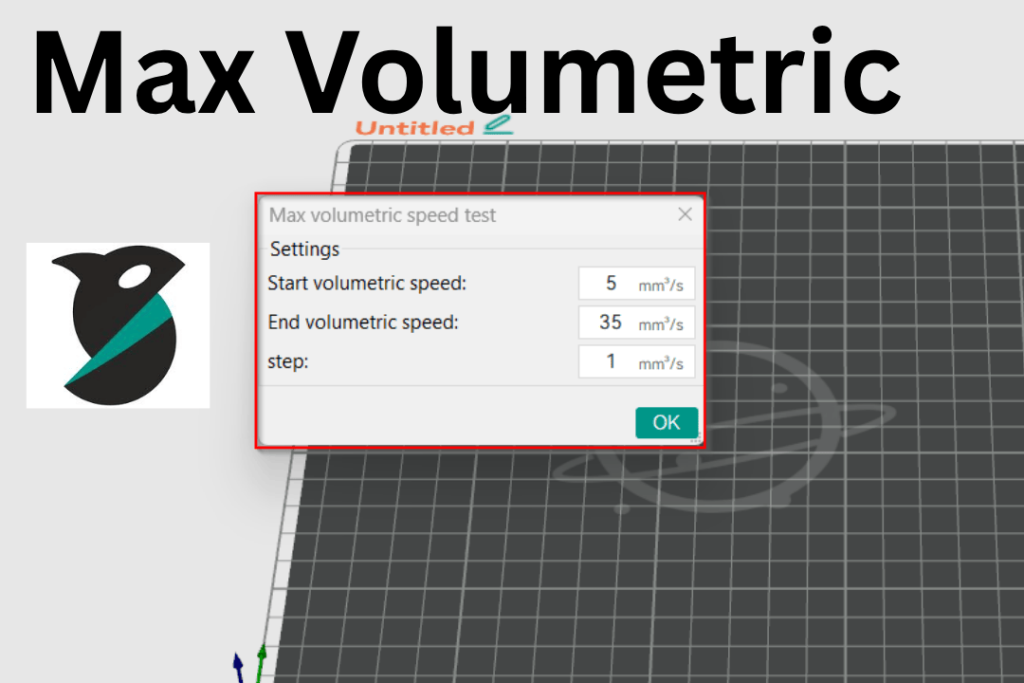
Max Volumetric Speed (Max Flowrate) represents the fastest speed at which your hotend can melt and push filament without under-extrusion. Every hotend has a maximum melt rate, and every filament has a limit. Printing faster than this creates gaps, weak walls, and inconsistent extrusion.
You need three values:
- Starting Flowrate (mm³/s)
- Lowest Failure Height (mm)
- Volumetric Step used during testing
The calculator determines the maximum volumetric flowrate your printer can handle reliably.
Pressure Advance Calculator (Tower Method)
Pressure Advance adjusts how your printer handles pressure changes inside the nozzle during fast moves, corners, and retractions. Incorrect PA causes:
- Blobs at corners
- Rounded edges
- Uneven extrusion
This calculator automatically computes the correct PA value from your PA tower test.
Enter:
- Starting Pressure Advance
- Lowest Failure Height (where the print first looks clean)
- PA Step Size
You instantly get your new, correct Pressure Advance value.
Flow Rate Calculator
Flow Rate (Flow Ratio) determines how much filament your printer extrudes. Proper flow calibration ensures:
- Smooth walls
- No gaps
- No over-extrusion
- Accurate dimensions
The calculator uses:
- Flow rate used in test
- Best Chip Value (from the printed calibration pattern)
It then generates the correct flow ratio to apply in Orca Slicer.
How This Calculator Helps You
✔ No formulas
✔ No guesswork
✔ Beginner-friendly
✔ Highly accurate values
✔ Works for any 3D printer using Orca Slicer
Whether you’re setting up a new printer or fine-tuning for different filaments, this calculator ensures reliable, consistent results.
This Orca Slicer Calculator Community Tool
This tool is built for 3D printing enthusiasts who want fast and accurate calibration. Orca Slicer includes powerful calibration systems, but the formulas can be confusing. Our goal is to make calibration easy, quick, and accessible.
Just enter your measurements, press “Calculate,” and update your slicer settings. That’s all.
Our website also includes Orca Slicer guides, tutorials, troubleshooting tips, and helpful resources all clean, clear, and always up-to-date.